Synthetic Data Generation with Known Ground Truth#
This notebook demonstrates how to generate synthetic spectroscopy data with controlled noise characteristics. This is useful for:
Use cases:
Testing fitting algorithms with known ground truth
Validating analysis pipelines
Exploring noise effects on parameter recovery
Creating test datasets for method development
Educational demonstrations
import os
import numpy as np
import trspecfit
1. Set Up Model#
Define the “ground truth” model that will generate your synthetic data.
# Create parent project
project = trspecfit.Project(path=os.getcwd())

# Create file instance with axes
file = trspecfit.File(
    parent_project=project,
    energy=np.arange(0, 20, 0.05),
    time=np.arange(-10, 100, 0.25)
)
# Load energy-resolved model
file.load_model(
    model_yaml='models_energy.yaml',
    model_info='single_peak'
)
Loading model to describe energy- (and time-)dependent data: single_peak
Model('single_peak', 3 comp, 9 pars, dim=1)
# Examine the energy model
file.describe_model()
model name: single_peak
function: Offset from trspecfit.functions.energy
function: LinBack from trspecfit.functions.energy
function: GLP from trspecfit.functions.energy
all lmfit.Parameters() [flattened and sorted alphabetically]:
Name               Value      Min      Max   Stderr     Vary     Expr Brute_Step
GLP_01_A              10        5       15     None     True     None     None
GLP_01_F               1     0.75      2.5     None     True     None     None
GLP_01_m             0.3        0        1     None     True     None     None
GLP_01_x0             10        5       15     None     True     None     None
LinBack_b              0       -5        5     None     True     None     None
LinBack_m            0.4       -1        1     None     True     None     None
LinBack_xStart         3        0       20     None    False     None     None
LinBack_xStop         15        0       20     None    False     None     None
Offset_y0              2        0        5     None     True     None     None
# Add time dependence to make it 2D
file.add_time_dependence(
    target_model='single_peak',
    target_parameter='GLP_01_x0',
    dynamics_yaml='models_time.yaml',
    dynamics_model='MonoExpPosIRF',
)

# Tip: Copy this cell to add more time dependencies for other parameters
Loading model to describe time-dependence of a model parameter: GLP_01_x0 of MonoExpPosIRF model
# Examine the complete 2D model
file.describe_model()
model name: single_peak
function: Offset from trspecfit.functions.energy
function: LinBack from trspecfit.functions.energy
function: GLP from trspecfit.functions.energy
all lmfit.Parameters() [flattened and sorted alphabetically]:
Name                        Value      Min      Max   Stderr     Vary     Expr Brute_Step
GLP_01_A                       10        5       15     None     True     None     None
GLP_01_F                        1     0.75      2.5     None     True     None     None
GLP_01_m                      0.3        0        1     None     True     None     None
GLP_01_x0                      10        5       15     None     True     None     None
GLP_01_x0_expFun_01_A           5        0       15     None     True     None     None
GLP_01_x0_expFun_01_t0          0        0        1     None    False     None     None
GLP_01_x0_expFun_01_tau        50        1      100     None     True     None     None
GLP_01_x0_gaussCONV_SD          3    1e-06       10     None     True     None     None
LinBack_b                       0       -5        5     None     True     None     None
LinBack_m                     0.4       -1        1     None     True     None     None
LinBack_xStart                  3        0       20     None    False     None     None
LinBack_xStop                  15        0       20     None    False     None     None
Offset_y0                       2        0        5     None     True     None     None
2. Visualize Ground Truth Model#
Before adding noise, visualize what the “clean” data looks like.
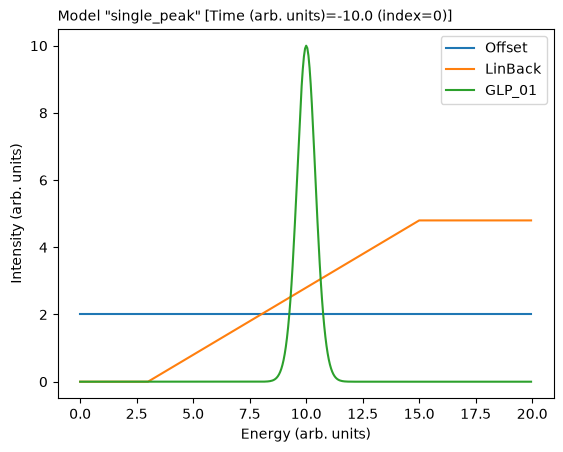
# Plot 1D spectrum at a specific time point
file.model_active.plot_1d(t_ind=0, plot_sum=False)
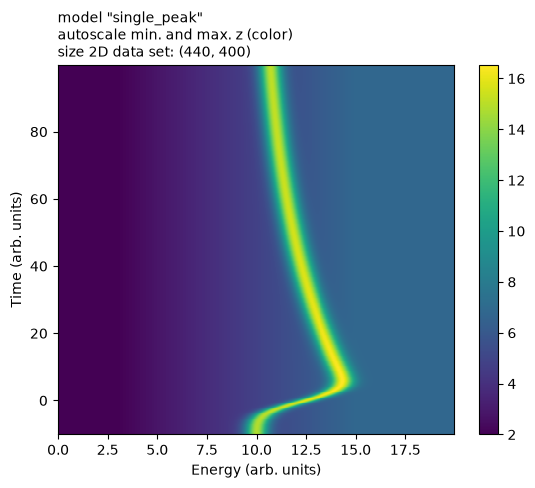
# Generate and plot full 2D dataset
file.model_active.create_value_2d()
file.model_active.plot_2d()
3. Configure Simulator#
Choose detection mode and noise characteristics.
Detection Modes:#
Analog Detection (detection='analog'):
Continuous signal measurement
Specify
noise_level(relative to signal, 0-1)Choose
noise_type:'gaussian'or'poisson'
Photon Counting (detection='photon_counting'):
Discrete photon events
Specify
counts_per_delay(orcount_rate+integration_time)Poisson noise (realistic for low photon counts)
# Create simulator with photon counting detection
sim = trspecfit.Simulator(
    model=file.model_active,
    detection='photon_counting',
    counts_per_delay=1E5,  # Adjust for desired SNR
    seed=42  # For reproducibility (None for random)
)
Alternative: Analog detection
sim = trspecfit.Simulator(
    model=file.model_active,
    detection='analog',
    noise_level=0.05,  # 5% noise relative to signal
    noise_type='gaussian',
    seed=42
)
4. Generate Synthetic Data#
Generate noisy data at different dimensionalities.
1D Simulation (Single Time Point)#
Useful for testing energy-resolved fitting.
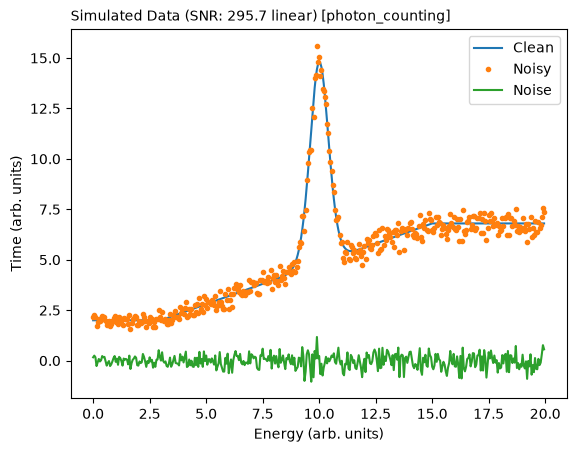
# Simulate 1D dataset at specific time index
sim_data_1d = sim.simulate_1d(t_ind=0)

# Visualize clean vs noisy
sim.plot_comparison(t_ind=0, dim=1)
2D Simulation (Full Time Series)#
Single realization of the full 2D dataset.
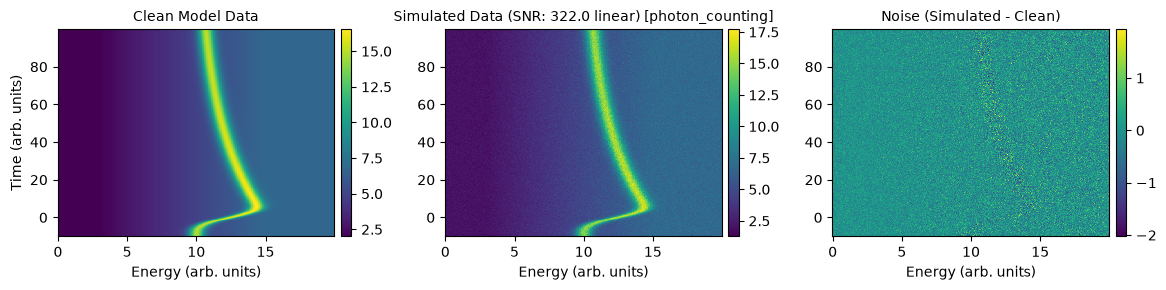
# Simulate full 2D dataset
sim_data_2d = sim.simulate_2d()

# Visualize clean data, noisy data, and noise only
sim.plot_comparison(dim=2)
Multiple Realizations#
Generate multiple independent noisy realizations for statistical analysis or testing.
# Simulate n independent realizations
clean_data, noisy_data_list, noise_list = sim.simulate_n(n=20)

print(f"Generated {len(noisy_data_list)} realizations")
print(f"Each shape: {noisy_data_list[0].shape}")
Generating clean data from model... Done
Generated 20 noisy datasets successfully
Generated 20 realizations
Each shape: (440, 400)
5. Save and Export Data#
Save simulated data for later use or fitting tests.
# Save all realizations to HDF5 file
sim.save_data(n_data=noisy_data_list)

print("\nData saved to 'simulated_data/' directory")
print("Files contain:")
print("  - Clean (ground truth) data")
print("  - Noisy realizations")
print("  - Noise-only data")
print("  - Energy and time axes")
print("  - Model parameters (ground truth)")
Data saved to: <repo>/examples/synthetic_data/01_simulator/simulated_data/simulated_data.h5

Data saved to 'simulated_data/' directory
Files contain:
  - Clean (ground truth) data
  - Noisy realizations
  - Noise-only data
  - Energy and time axes
  - Model parameters (ground truth)
Tips for Synthetic Data Generation#
Noise Levels:
Match your experimental conditions
Test multiple noise levels to understand robustness
Photon counting: Lower counts_per_delay = higher noise
Analog: noise_level of 0.05-0.10 is typical for good SNR
Parameter Ranges:
Use realistic parameter values from your experiments
Test edge cases (very fast/slow dynamics, weak/strong signals)
Ensure parameters produce physically meaningful spectra
Multiple Realizations:
N=10-20 sufficient for testing fitting algorithms
N=50+ for robust statistical analysis
Each realization is independent (different noise)
Validation Strategy:
Always fit simulated data to verify parameter recovery
Compare fitted parameters to ground truth
Check if confidence intervals contain true values
Test with different initial guesses
File Organization:
Save different noise levels in separate files
Include metadata about simulation parameters
Keep ground truth parameters with simulated data
Model files#
The YAML files next to this notebook, as shipped with the example.
models_energy.yaml#
# use these models to describe the energy-dependent data
# (available functions info: /src/trspecfit/functions/energy.py)

single_peak:
    Offset:
      y0: [2, True, 0, 5]
    LinBack:
      m: [4E-1, True, -1, 1]
      b: [0, True, -5, 5]
      xStart: [3, False, 0, 20]
      xStop: [15, False, 0, 20]
    GLP:
      A: [10, True, 5, 15]
      x0: [10, True, 5, 15]
      F: [1.0, True, 0.75, 2.5]
      m: [0.3, True, 0, 1]

single_peak_only:
    GLP:
      A: [10, True, 5, 15]
      x0: [10, True, 5, 15]
      F: [1.0, True, 0.75, 2.5]
      m: [0.3, True, 0, 1]

dependent_peaks:
    Offset:
      y0: [2, True, 0, 5]
    Shirley:
      pShirley: [4.0E-4, True, 1.0E-12, 1.0E-3]
    GLP:
      A: [10, True, 5, 15]
      x0: [8, True, 3, 12]
      F: [1.0, True, 0.75, 2.5]
      m: [0.3, True, 0, 1]
    GLP:
      A: ["GLP_01_A*3/4"]
      x0: ["GLP_01_x0+3.6"]
      F: ["GLP_01_F"]
      m: ["GLP_01_m"]
models_time.yaml#
# use these models to add time-dependence to a parameter in a 2D model
# (available functions info: /src/trspecfit/functions/time.py)

IRF:
    # define Gauss to convolve everything with
    # (instrument response function)
    gaussCONV:
        SD: [5.0E-2, True, 1.0E-6, 1]

MonoExpPos:
    # expFun(t, A, tau, t0)
    expFun:
        A: [1, True, 0, 5]
        tau: [2.5, True, 1, 10]
        t0: [0, False, 0, 1]

MonoExpNeg:
    # expFun(t, A, tau, t0)
    expFun:
        A: [-1, True, -5, 0]
        tau: [2.5, True, 1, 10]
        t0: [0, False, 0, 1]

MonoExpPosIRF:
    gaussCONV:
        SD: [3, True, 1.0E-6, 10]
    expFun:
        A: [5, True, 0, 15]
        tau: [50, True, 1, 100]
        t0: [0, False, 0, 1]
project.yaml#
# Project configuration for trspecfit simulator example

# Display settings (general verbosity)
show_output: 1  # 0: silent/API mode, 1: interactive/notebook mode

# Axis labels
e_label: 'Energy (arb. units)' # x -> energy
t_label: 'Time (arb. units)' # y -> time
z_label: 'Intensity (arb. units)' # z -> intensity

# Plot settings
x_dir: 'def'  # def(ault) or rev(erse)
x_type: 'lin'  # lin or log
y_dir: 'def'  # def(ault) or rev(erse)
y_type: 'lin'  # lin or log
z_colormap: 'viridis' # colormap in 2D plots
z_type: 'lin'  # lin or log (2D plots)
dpi_plt: 100 # figure display dpi
dpi_save: 300 # figure save dpi
res_mult: 5 # residual multiplier in figures