ML Training Data Generation with Parameter Sweeps#
This notebook demonstrates how to generate synthetic training datasets for machine learning by systematically varying model parameters.
Use cases:
Training neural networks for spectroscopy analysis
Testing parameter recovery algorithms
Exploring parameter sensitivity and identifiability
Generating data for uncertainty quantification studies
import os
import numpy as np
import trspecfit
from trspecfit.utils.sweep import ParameterSweep, SweepDataset
1. Set Up Model#
First, create your model as usual. This will be the “ground truth” model that we’ll vary to generate training data.
# Create parent project
project = trspecfit.Project(path=os.getcwd())

# Create file instance with axes
file = trspecfit.File(
    parent_project=project,
    energy=np.arange(0, 20, 0.01),
    time=np.arange(-10, 100, 0.1)
)
# Load energy-resolved model
file.load_model(
    model_yaml='models_energy.yaml',
    model_info='single_peak'
)
Loading model to describe energy- (and time-)dependent data: single_peak
Model('single_peak', 3 comp, 9 pars, dim=1)
# Add time dependence to make it 2D
file.add_time_dependence(
    target_model='single_peak',
    target_parameter='GLP_01_x0',
    dynamics_yaml='models_time.yaml',
    dynamics_model='MonoExpPosIRF',
)
Loading model to describe time-dependence of a model parameter: GLP_01_x0 of MonoExpPosIRF model
# Examine the model structure
file.model_active.describe()
model name: single_peak
function: Offset from trspecfit.functions.energy
function: LinBack from trspecfit.functions.energy
function: GLP from trspecfit.functions.energy
all lmfit.Parameters() [flattened and sorted alphabetically]:
Name                        Value      Min      Max   Stderr     Vary     Expr Brute_Step
GLP_01_A                       10        5       15     None     True     None     None
GLP_01_F                        1     0.75      2.5     None     True     None     None
GLP_01_m                      0.3        0        1     None     True     None     None
GLP_01_x0                      10        5       15     None     True     None     None
GLP_01_x0_expFun_01_A           5        0       15     None     True     None     None
GLP_01_x0_expFun_01_t0          0        0        1     None    False     None     None
GLP_01_x0_expFun_01_tau        50        1      100     None     True     None     None
GLP_01_x0_gaussCONV_SD          3    1e-06       10     None     True     None     None
LinBack_b                       0       -5        5     None     True     None     None
LinBack_m                     0.4       -1        1     None     True     None     None
LinBack_xStart                  3        0       20     None    False     None     None
LinBack_xStop                  15        0       20     None    False     None     None
Offset_y0                       2        0        5     None     True     None     None
2. Define Parameter Space#
Choose which parameters to vary and how. You can use:
Discrete ranges:
add_range()for specific valuesContinuous distributions:
add_uniform(),add_normal(),add_lognormal()
Strategy options:
'grid': Full combinatorial - every combination (good for small spaces)'random': Independent sampling (scalable for ML)
Example 1: Small Grid Sweep#
Good for systematic exploration of a few parameter values.
# Define a small grid
sweep_grid = ParameterSweep(strategy='grid', seed=42)
sweep_grid.add_range('GLP_01_x0_expFun_01_A', [0.25, 1, 4])
sweep_grid.add_uniform('GLP_01_x0_expFun_01_tau', min_val=5, max_val=25, n_samples=3)

print(f"Total configurations: {sweep_grid.get_n_configs()}")
print("\nFirst 5 configurations:")
for i, config in enumerate(sweep_grid):
    if i >= 5:
        break
    print(f"  Config {i}: {config}")
Total configurations: 9

First 5 configurations:
  Config 0: {'GLP_01_x0_expFun_01_A': np.float64(0.25), 'GLP_01_x0_expFun_01_tau': np.float64(20.479120971119265)}
  Config 1: {'GLP_01_x0_expFun_01_A': np.float64(0.25), 'GLP_01_x0_expFun_01_tau': np.float64(13.777568795041047)}
  Config 2: {'GLP_01_x0_expFun_01_A': np.float64(0.25), 'GLP_01_x0_expFun_01_tau': np.float64(22.17195839822765)}
  Config 3: {'GLP_01_x0_expFun_01_A': np.float64(1.0), 'GLP_01_x0_expFun_01_tau': np.float64(20.479120971119265)}
  Config 4: {'GLP_01_x0_expFun_01_A': np.float64(1.0), 'GLP_01_x0_expFun_01_tau': np.float64(13.777568795041047)}
Example 2: Random Sampling (Recommended for ML)#
Samples parameters independently - scales to large datasets.
# Define random sampling sweep
sweep_random = ParameterSweep(strategy='random', seed=42)

# Vary peak amplitude
sweep_random.add_uniform('GLP_01_A', min_val=8, max_val=12, n_samples=100)

# Vary peak position
sweep_random.add_uniform('GLP_01_x0', min_val=8, max_val=12, n_samples=100)

# Vary dynamics amplitude
sweep_random.add_uniform('GLP_01_x0_expFun_01_A', min_val=0.5, max_val=5, n_samples=100)

# Vary decay time constant
sweep_random.add_uniform('GLP_01_x0_expFun_01_tau', min_val=10, max_val=80, n_samples=100)

print(f"Total configurations: {sweep_random.get_n_configs()}")
print("\nFirst 5 configurations:")
for i, config in enumerate(sweep_random):
    if i >= 5:
        break
    print(f"  Config {i}:")
    for k, v in config.items():
        print(f"    {k}: {v:.3f}")
Total configurations: 100

First 5 configurations:
  Config 0:
    GLP_01_A: 11.096
    GLP_01_x0: 9.756
    GLP_01_x0_expFun_01_A: 4.364
    GLP_01_x0_expFun_01_tau: 58.816
  Config 1:
    GLP_01_A: 8.377
    GLP_01_x0: 11.902
    GLP_01_x0_expFun_01_A: 3.925
    GLP_01_x0_expFun_01_tau: 65.025
  Config 2:
    GLP_01_A: 8.512
    GLP_01_x0: 9.802
    GLP_01_x0_expFun_01_A: 2.169
    GLP_01_x0_expFun_01_tau: 74.874
  Config 3:
    GLP_01_A: 10.575
    GLP_01_x0: 11.291
    GLP_01_x0_expFun_01_A: 2.495
    GLP_01_x0_expFun_01_tau: 25.907
  Config 4:
    GLP_01_A: 10.218
    GLP_01_x0: 8.255
    GLP_01_x0_expFun_01_A: 4.224
    GLP_01_x0_expFun_01_tau: 54.217
3. Generate Training Data#
Use simulate_parameter_sweep() to generate datasets. This:
Iterates through parameter configurations
Updates model parameters
Generates N noisy realizations per configuration
Saves everything to HDF5 file
Memory efficiency: Only one configuration in memory at a time!
# Create simulator
sim = trspecfit.Simulator(
    model=file.model_active,
    detection='analog',
    noise_level=0.05,
    noise_type='poisson',
    seed=42
)
Small Test Dataset (Quick)#
Generate a small dataset first to verify everything works.
# Use the grid sweep for quick test
sim.simulate_parameter_sweep(
    parameter_sweep=sweep_grid,
    n_realizations=3,
    filepath='test_sweep.h5',
    show_progress=True
)
Starting parameter sweep:
  Total configurations: 9
  Realizations per config: 3
  Total datasets: 27
  Output file: <repo>/examples/synthetic_data/02_ml_training_data/simulated_data/test_sweep.h5

Processing config 1/9: {GLP_01_x0_expFun_01_A=0.25, GLP_01_x0_expFun_01_tau=20.5}
  ✓ Saved config 1 with 3 realizations
Processing config 2/9: {GLP_01_x0_expFun_01_A=0.25, GLP_01_x0_expFun_01_tau=13.8}
  ✓ Saved config 2 with 3 realizations
Processing config 3/9: {GLP_01_x0_expFun_01_A=0.25, GLP_01_x0_expFun_01_tau=22.2}
  ✓ Saved config 3 with 3 realizations
Processing config 4/9: {GLP_01_x0_expFun_01_A=1, GLP_01_x0_expFun_01_tau=20.5}
  ✓ Saved config 4 with 3 realizations
Processing config 5/9: {GLP_01_x0_expFun_01_A=1, GLP_01_x0_expFun_01_tau=13.8}
  ✓ Saved config 5 with 3 realizations
Processing config 6/9: {GLP_01_x0_expFun_01_A=1, GLP_01_x0_expFun_01_tau=22.2}
  ✓ Saved config 6 with 3 realizations
Processing config 7/9: {GLP_01_x0_expFun_01_A=4, GLP_01_x0_expFun_01_tau=20.5}
  ✓ Saved config 7 with 3 realizations
Processing config 8/9: {GLP_01_x0_expFun_01_A=4, GLP_01_x0_expFun_01_tau=13.8}
  ✓ Saved config 8 with 3 realizations
Processing config 9/9: {GLP_01_x0_expFun_01_A=4, GLP_01_x0_expFun_01_tau=22.2}
  ✓ Saved config 9 with 3 realizations

============================================================
Parameter sweep complete!
Generated 9 configs × 3 realizations
Total datasets: 27
Data saved to: <repo>/examples/synthetic_data/02_ml_training_data/simulated_data/test_sweep.h5
============================================================
Large Training Dataset (Takes Time)#
Generate the full ML training dataset. Adjust n_realizations based on your needs:
N=10-20: Good for most ML applications
N=50+: For robust uncertainty quantification
Size and runtime. The next cell writes about 37 GB to
simulated_data/ml_training_data.h5: 100 configurations × 21 arrays (the clean map plus 20 noisy realizations) of 1100 × 2000 float64 values, stored uncompressed. It takes about 3 minutes on a laptop NVMe drive, longer on slower disks; only one configuration is held in memory at a time. The size scales withn_samples × (n_realizations + 1), so lower either to try the workflow cheaply, or skip this cell and point §4 attest_sweep.h5from the quick test above.
# Generate large training dataset
# WARNING: This can take up to several minutes!
sim.simulate_parameter_sweep(
    parameter_sweep=sweep_random,
    n_realizations=20,
    filepath='ml_training_data.h5',
    show_progress=True
)

# Result: 100 configs × 20 realizations = 2000 training examples
Starting parameter sweep:
  Total configurations: 100
  Realizations per config: 20
  Total datasets: 2000
  Output file: <repo>/examples/synthetic_data/02_ml_training_data/simulated_data/ml_training_data.h5

Processing config 1/100: {GLP_01_A=11.1, GLP_01_x0=9.76, GLP_01_x0_expFun_01_A=4.36, GLP_01_x0_expFun_01_tau=58.8}
  ✓ Saved config 1 with 20 realizations
Processing config 2/100: {GLP_01_A=8.38, GLP_01_x0=11.9, GLP_01_x0_expFun_01_A=3.93, GLP_01_x0_expFun_01_tau=65}
  ✓ Saved config 2 with 20 realizations
Processing config 3/100: {GLP_01_A=8.51, GLP_01_x0=9.8, GLP_01_x0_expFun_01_A=2.17, GLP_01_x0_expFun_01_tau=74.9}
  ✓ Saved config 3 with 20 realizations
Processing config 4/100: {GLP_01_A=10.6, GLP_01_x0=11.3, GLP_01_x0_expFun_01_A=2.5, GLP_01_x0_expFun_01_tau=25.9}
  ✓ Saved config 4 with 20 realizations
Processing config 5/100: {GLP_01_A=10.2, GLP_01_x0=8.26, GLP_01_x0_expFun_01_A=4.22, GLP_01_x0_expFun_01_tau=54.2}
  ✓ Saved config 5 with 20 realizations
Processing config 6/100: {GLP_01_A=11, GLP_01_x0=9.42, GLP_01_x0_expFun_01_A=4.87, GLP_01_x0_expFun_01_tau=72.5}
  ✓ Saved config 6 with 20 realizations
Processing config 7/100: {GLP_01_A=11.1, GLP_01_x0=8.78, GLP_01_x0_expFun_01_A=2.6, GLP_01_x0_expFun_01_tau=13.1}
  ✓ Saved config 7 with 20 realizations
Processing config 8/100: {GLP_01_A=8.62, GLP_01_x0=10.7, GLP_01_x0_expFun_01_A=3.85, GLP_01_x0_expFun_01_tau=77.7}
  ✓ Saved config 8 with 20 realizations
Processing config 9/100: {GLP_01_A=9.3, GLP_01_x0=9.48, GLP_01_x0_expFun_01_A=2.61, GLP_01_x0_expFun_01_tau=23.3}
  ✓ Saved config 9 with 20 realizations
Processing config 10/100: {GLP_01_A=8.52, GLP_01_x0=9.9, GLP_01_x0_expFun_01_A=1.52, GLP_01_x0_expFun_01_tau=56.9}
  ✓ Saved config 10 with 20 realizations
Processing config 11/100: {GLP_01_A=9.75, GLP_01_x0=11.3, GLP_01_x0_expFun_01_A=3.65, GLP_01_x0_expFun_01_tau=31.9}
  ✓ Saved config 11 with 20 realizations
Processing config 12/100: {GLP_01_A=11.3, GLP_01_x0=11.2, GLP_01_x0_expFun_01_A=2.24, GLP_01_x0_expFun_01_tau=30.2}
  ✓ Saved config 12 with 20 realizations
Processing config 13/100: {GLP_01_A=10.7, GLP_01_x0=8.56, GLP_01_x0_expFun_01_A=1.4, GLP_01_x0_expFun_01_tau=10.5}
  ✓ Saved config 13 with 20 realizations
Processing config 14/100: {GLP_01_A=11.1, GLP_01_x0=10.7, GLP_01_x0_expFun_01_A=3.67, GLP_01_x0_expFun_01_tau=64.7}
  ✓ Saved config 14 with 20 realizations
Processing config 15/100: {GLP_01_A=9.84, GLP_01_x0=10.3, GLP_01_x0_expFun_01_A=1.13, GLP_01_x0_expFun_01_tau=18}
  ✓ Saved config 15 with 20 realizations
Processing config 16/100: {GLP_01_A=10.7, GLP_01_x0=9.88, GLP_01_x0_expFun_01_A=3.04, GLP_01_x0_expFun_01_tau=63.5}
  ✓ Saved config 16 with 20 realizations
Processing config 17/100: {GLP_01_A=10.5, GLP_01_x0=10.2, GLP_01_x0_expFun_01_A=3.02, GLP_01_x0_expFun_01_tau=31.3}
  ✓ Saved config 17 with 20 realizations
Processing config 18/100: {GLP_01_A=8.12, GLP_01_x0=9.75, GLP_01_x0_expFun_01_A=1.47, GLP_01_x0_expFun_01_tau=38.6}
  ✓ Saved config 18 with 20 realizations
Processing config 19/100: {GLP_01_A=11.4, GLP_01_x0=8.94, GLP_01_x0_expFun_01_A=0.762, GLP_01_x0_expFun_01_tau=29.7}
  ✓ Saved config 19 with 20 realizations
Processing config 20/100: {GLP_01_A=9.17, GLP_01_x0=10.6, GLP_01_x0_expFun_01_A=3.01, GLP_01_x0_expFun_01_tau=64.9}
  ✓ Saved config 20 with 20 realizations
Processing config 21/100: {GLP_01_A=10.7, GLP_01_x0=9.63, GLP_01_x0_expFun_01_A=4.16, GLP_01_x0_expFun_01_tau=21.7}
  ✓ Saved config 21 with 20 realizations
Processing config 22/100: {GLP_01_A=8.09, GLP_01_x0=8.36, GLP_01_x0_expFun_01_A=3.75, GLP_01_x0_expFun_01_tau=42.3}
  ✓ Saved config 22 with 20 realizations
Processing config 23/100: {GLP_01_A=8.65, GLP_01_x0=10, GLP_01_x0_expFun_01_A=1.19, GLP_01_x0_expFun_01_tau=58.7}
  ✓ Saved config 23 with 20 realizations
Processing config 24/100: {GLP_01_A=9.78, GLP_01_x0=9.52, GLP_01_x0_expFun_01_A=1.86, GLP_01_x0_expFun_01_tau=54.1}
  ✓ Saved config 24 with 20 realizations
Processing config 25/100: {GLP_01_A=9.45, GLP_01_x0=8.35, GLP_01_x0_expFun_01_A=1.03, GLP_01_x0_expFun_01_tau=77.3}
  ✓ Saved config 25 with 20 realizations
Processing config 26/100: {GLP_01_A=11.6, GLP_01_x0=10.8, GLP_01_x0_expFun_01_A=1.7, GLP_01_x0_expFun_01_tau=77.8}
  ✓ Saved config 26 with 20 realizations
Processing config 27/100: {GLP_01_A=11.1, GLP_01_x0=10.9, GLP_01_x0_expFun_01_A=2.52, GLP_01_x0_expFun_01_tau=29.1}
  ✓ Saved config 27 with 20 realizations
Processing config 28/100: {GLP_01_A=8.39, GLP_01_x0=11.6, GLP_01_x0_expFun_01_A=2.55, GLP_01_x0_expFun_01_tau=24.2}
  ✓ Saved config 28 with 20 realizations
Processing config 29/100: {GLP_01_A=9.22, GLP_01_x0=10.3, GLP_01_x0_expFun_01_A=1.3, GLP_01_x0_expFun_01_tau=70}
  ✓ Saved config 29 with 20 realizations
Processing config 30/100: {GLP_01_A=11, GLP_01_x0=10.9, GLP_01_x0_expFun_01_A=2.44, GLP_01_x0_expFun_01_tau=53.9}
  ✓ Saved config 30 with 20 realizations
Processing config 31/100: {GLP_01_A=10.3, GLP_01_x0=10.6, GLP_01_x0_expFun_01_A=0.88, GLP_01_x0_expFun_01_tau=39.1}
  ✓ Saved config 31 with 20 realizations
Processing config 32/100: {GLP_01_A=8.17, GLP_01_x0=9.98, GLP_01_x0_expFun_01_A=1.98, GLP_01_x0_expFun_01_tau=20.1}
  ✓ Saved config 32 with 20 realizations
Processing config 33/100: {GLP_01_A=8.41, GLP_01_x0=10.4, GLP_01_x0_expFun_01_A=1.27, GLP_01_x0_expFun_01_tau=74.8}
  ✓ Saved config 33 with 20 realizations
Processing config 34/100: {GLP_01_A=10.3, GLP_01_x0=9.39, GLP_01_x0_expFun_01_A=3.16, GLP_01_x0_expFun_01_tau=11.6}
  ✓ Saved config 34 with 20 realizations
Processing config 35/100: {GLP_01_A=11.8, GLP_01_x0=9.93, GLP_01_x0_expFun_01_A=4.02, GLP_01_x0_expFun_01_tau=15.8}
  ✓ Saved config 35 with 20 realizations
Processing config 36/100: {GLP_01_A=9.95, GLP_01_x0=9.96, GLP_01_x0_expFun_01_A=4.72, GLP_01_x0_expFun_01_tau=50}
  ✓ Saved config 36 with 20 realizations
Processing config 37/100: {GLP_01_A=9.89, GLP_01_x0=9.07, GLP_01_x0_expFun_01_A=1.99, GLP_01_x0_expFun_01_tau=46.4}
  ✓ Saved config 37 with 20 realizations
Processing config 38/100: {GLP_01_A=9.76, GLP_01_x0=8.09, GLP_01_x0_expFun_01_A=4.22, GLP_01_x0_expFun_01_tau=72.7}
  ✓ Saved config 38 with 20 realizations
Processing config 39/100: {GLP_01_A=8.56, GLP_01_x0=10.2, GLP_01_x0_expFun_01_A=0.989, GLP_01_x0_expFun_01_tau=57.1}
  ✓ Saved config 39 with 20 realizations
Processing config 40/100: {GLP_01_A=9.12, GLP_01_x0=10.6, GLP_01_x0_expFun_01_A=3.77, GLP_01_x0_expFun_01_tau=63.8}
  ✓ Saved config 40 with 20 realizations
Processing config 41/100: {GLP_01_A=8.43, GLP_01_x0=11.7, GLP_01_x0_expFun_01_A=1.54, GLP_01_x0_expFun_01_tau=12.6}
  ✓ Saved config 41 with 20 realizations
Processing config 42/100: {GLP_01_A=10.2, GLP_01_x0=9.48, GLP_01_x0_expFun_01_A=4.23, GLP_01_x0_expFun_01_tau=66.6}
  ✓ Saved config 42 with 20 realizations
Processing config 43/100: {GLP_01_A=9.27, GLP_01_x0=11.8, GLP_01_x0_expFun_01_A=1.81, GLP_01_x0_expFun_01_tau=46.1}
  ✓ Saved config 43 with 20 realizations
Processing config 44/100: {GLP_01_A=9.02, GLP_01_x0=11.7, GLP_01_x0_expFun_01_A=1.24, GLP_01_x0_expFun_01_tau=13.1}
  ✓ Saved config 44 with 20 realizations
Processing config 45/100: {GLP_01_A=9.74, GLP_01_x0=12, GLP_01_x0_expFun_01_A=4.51, GLP_01_x0_expFun_01_tau=62.4}
  ✓ Saved config 45 with 20 realizations
Processing config 46/100: {GLP_01_A=11.6, GLP_01_x0=11.6, GLP_01_x0_expFun_01_A=2.83, GLP_01_x0_expFun_01_tau=32.1}
  ✓ Saved config 46 with 20 realizations
Processing config 47/100: {GLP_01_A=11.1, GLP_01_x0=10.6, GLP_01_x0_expFun_01_A=2.18, GLP_01_x0_expFun_01_tau=16.6}
  ✓ Saved config 47 with 20 realizations
Processing config 48/100: {GLP_01_A=11, GLP_01_x0=9.05, GLP_01_x0_expFun_01_A=4.72, GLP_01_x0_expFun_01_tau=26.9}
  ✓ Saved config 48 with 20 realizations
Processing config 49/100: {GLP_01_A=8.49, GLP_01_x0=11.3, GLP_01_x0_expFun_01_A=1.19, GLP_01_x0_expFun_01_tau=22.5}
  ✓ Saved config 49 with 20 realizations
Processing config 50/100: {GLP_01_A=10.4, GLP_01_x0=11.5, GLP_01_x0_expFun_01_A=1.38, GLP_01_x0_expFun_01_tau=31.7}
  ✓ Saved config 50 with 20 realizations
Processing config 51/100: {GLP_01_A=11.1, GLP_01_x0=11.9, GLP_01_x0_expFun_01_A=2.75, GLP_01_x0_expFun_01_tau=20.1}
  ✓ Saved config 51 with 20 realizations
Processing config 52/100: {GLP_01_A=8.06, GLP_01_x0=8.92, GLP_01_x0_expFun_01_A=1.09, GLP_01_x0_expFun_01_tau=57.4}
  ✓ Saved config 52 with 20 realizations
Processing config 53/100: {GLP_01_A=8.49, GLP_01_x0=10, GLP_01_x0_expFun_01_A=3.62, GLP_01_x0_expFun_01_tau=50.7}
  ✓ Saved config 53 with 20 realizations
Processing config 54/100: {GLP_01_A=8.8, GLP_01_x0=11.2, GLP_01_x0_expFun_01_A=3.72, GLP_01_x0_expFun_01_tau=61.7}
  ✓ Saved config 54 with 20 realizations
Processing config 55/100: {GLP_01_A=8.52, GLP_01_x0=8.5, GLP_01_x0_expFun_01_A=4.67, GLP_01_x0_expFun_01_tau=37.8}
  ✓ Saved config 55 with 20 realizations
Processing config 56/100: {GLP_01_A=9.2, GLP_01_x0=9.95, GLP_01_x0_expFun_01_A=3.48, GLP_01_x0_expFun_01_tau=76.9}
  ✓ Saved config 56 with 20 realizations
Processing config 57/100: {GLP_01_A=9.15, GLP_01_x0=11.7, GLP_01_x0_expFun_01_A=0.612, GLP_01_x0_expFun_01_tau=48.9}
  ✓ Saved config 57 with 20 realizations
Processing config 58/100: {GLP_01_A=10.5, GLP_01_x0=8.42, GLP_01_x0_expFun_01_A=1.13, GLP_01_x0_expFun_01_tau=39.3}
  ✓ Saved config 58 with 20 realizations
Processing config 59/100: {GLP_01_A=11.9, GLP_01_x0=10.4, GLP_01_x0_expFun_01_A=4.7, GLP_01_x0_expFun_01_tau=66.3}
  ✓ Saved config 59 with 20 realizations
Processing config 60/100: {GLP_01_A=9.87, GLP_01_x0=11.1, GLP_01_x0_expFun_01_A=0.58, GLP_01_x0_expFun_01_tau=17.6}
  ✓ Saved config 60 with 20 realizations
Processing config 61/100: {GLP_01_A=11.3, GLP_01_x0=11.2, GLP_01_x0_expFun_01_A=1.55, GLP_01_x0_expFun_01_tau=47.2}
  ✓ Saved config 61 with 20 realizations
Processing config 62/100: {GLP_01_A=10.4, GLP_01_x0=11.5, GLP_01_x0_expFun_01_A=3.21, GLP_01_x0_expFun_01_tau=38.9}
  ✓ Saved config 62 with 20 realizations
Processing config 63/100: {GLP_01_A=9.5, GLP_01_x0=9.7, GLP_01_x0_expFun_01_A=3.43, GLP_01_x0_expFun_01_tau=70.7}
  ✓ Saved config 63 with 20 realizations
Processing config 64/100: {GLP_01_A=9.82, GLP_01_x0=8.99, GLP_01_x0_expFun_01_A=1.56, GLP_01_x0_expFun_01_tau=62.2}
  ✓ Saved config 64 with 20 realizations
Processing config 65/100: {GLP_01_A=11.3, GLP_01_x0=8.42, GLP_01_x0_expFun_01_A=0.8, GLP_01_x0_expFun_01_tau=51.6}
  ✓ Saved config 65 with 20 realizations
Processing config 66/100: {GLP_01_A=8.58, GLP_01_x0=11.3, GLP_01_x0_expFun_01_A=1.9, GLP_01_x0_expFun_01_tau=20.1}
  ✓ Saved config 66 with 20 realizations
Processing config 67/100: {GLP_01_A=11.7, GLP_01_x0=8.66, GLP_01_x0_expFun_01_A=1.78, GLP_01_x0_expFun_01_tau=20.8}
  ✓ Saved config 67 with 20 realizations
Processing config 68/100: {GLP_01_A=8.46, GLP_01_x0=8.08, GLP_01_x0_expFun_01_A=0.749, GLP_01_x0_expFun_01_tau=22.2}
  ✓ Saved config 68 with 20 realizations
Processing config 69/100: {GLP_01_A=8.21, GLP_01_x0=10.4, GLP_01_x0_expFun_01_A=3.56, GLP_01_x0_expFun_01_tau=37.6}
  ✓ Saved config 69 with 20 realizations
Processing config 70/100: {GLP_01_A=9.27, GLP_01_x0=10, GLP_01_x0_expFun_01_A=4.44, GLP_01_x0_expFun_01_tau=69.6}
  ✓ Saved config 70 with 20 realizations
Processing config 71/100: {GLP_01_A=8.17, GLP_01_x0=8.73, GLP_01_x0_expFun_01_A=1.57, GLP_01_x0_expFun_01_tau=27.5}
  ✓ Saved config 71 with 20 realizations
Processing config 72/100: {GLP_01_A=10.3, GLP_01_x0=9.67, GLP_01_x0_expFun_01_A=0.722, GLP_01_x0_expFun_01_tau=36.2}
  ✓ Saved config 72 with 20 realizations
Processing config 73/100: {GLP_01_A=10.1, GLP_01_x0=8.41, GLP_01_x0_expFun_01_A=4.25, GLP_01_x0_expFun_01_tau=13.6}
  ✓ Saved config 73 with 20 realizations
Processing config 74/100: {GLP_01_A=11.7, GLP_01_x0=8.4, GLP_01_x0_expFun_01_A=4.3, GLP_01_x0_expFun_01_tau=73.2}
  ✓ Saved config 74 with 20 realizations
Processing config 75/100: {GLP_01_A=11.9, GLP_01_x0=11.2, GLP_01_x0_expFun_01_A=4.01, GLP_01_x0_expFun_01_tau=55}
  ✓ Saved config 75 with 20 realizations
Processing config 76/100: {GLP_01_A=11.1, GLP_01_x0=8.54, GLP_01_x0_expFun_01_A=2.91, GLP_01_x0_expFun_01_tau=46}
  ✓ Saved config 76 with 20 realizations
Processing config 77/100: {GLP_01_A=11.4, GLP_01_x0=9.85, GLP_01_x0_expFun_01_A=2.23, GLP_01_x0_expFun_01_tau=54.8}
  ✓ Saved config 77 with 20 realizations
Processing config 78/100: {GLP_01_A=9.07, GLP_01_x0=8.56, GLP_01_x0_expFun_01_A=2.65, GLP_01_x0_expFun_01_tau=39.2}
  ✓ Saved config 78 with 20 realizations
Processing config 79/100: {GLP_01_A=8.93, GLP_01_x0=9.47, GLP_01_x0_expFun_01_A=2.15, GLP_01_x0_expFun_01_tau=32.9}
  ✓ Saved config 79 with 20 realizations
Processing config 80/100: {GLP_01_A=9.52, GLP_01_x0=10.7, GLP_01_x0_expFun_01_A=1.84, GLP_01_x0_expFun_01_tau=76.4}
  ✓ Saved config 80 with 20 realizations
Processing config 81/100: {GLP_01_A=11.7, GLP_01_x0=9.92, GLP_01_x0_expFun_01_A=1.98, GLP_01_x0_expFun_01_tau=47.5}
  ✓ Saved config 81 with 20 realizations
Processing config 82/100: {GLP_01_A=11.4, GLP_01_x0=10.6, GLP_01_x0_expFun_01_A=4.12, GLP_01_x0_expFun_01_tau=47.3}
  ✓ Saved config 82 with 20 realizations
Processing config 83/100: {GLP_01_A=10.5, GLP_01_x0=9.15, GLP_01_x0_expFun_01_A=3.81, GLP_01_x0_expFun_01_tau=24.2}
  ✓ Saved config 83 with 20 realizations
Processing config 84/100: {GLP_01_A=10.8, GLP_01_x0=11.4, GLP_01_x0_expFun_01_A=1.09, GLP_01_x0_expFun_01_tau=53}
  ✓ Saved config 84 with 20 realizations
Processing config 85/100: {GLP_01_A=8.38, GLP_01_x0=10.9, GLP_01_x0_expFun_01_A=0.88, GLP_01_x0_expFun_01_tau=75.5}
  ✓ Saved config 85 with 20 realizations
Processing config 86/100: {GLP_01_A=8.55, GLP_01_x0=11.8, GLP_01_x0_expFun_01_A=4.1, GLP_01_x0_expFun_01_tau=51.6}
  ✓ Saved config 86 with 20 realizations
Processing config 87/100: {GLP_01_A=11.1, GLP_01_x0=11.2, GLP_01_x0_expFun_01_A=4.76, GLP_01_x0_expFun_01_tau=27.7}
  ✓ Saved config 87 with 20 realizations
Processing config 88/100: {GLP_01_A=10.4, GLP_01_x0=8.38, GLP_01_x0_expFun_01_A=3.27, GLP_01_x0_expFun_01_tau=22}
  ✓ Saved config 88 with 20 realizations
Processing config 89/100: {GLP_01_A=10.3, GLP_01_x0=10.3, GLP_01_x0_expFun_01_A=2.6, GLP_01_x0_expFun_01_tau=46.6}
  ✓ Saved config 89 with 20 realizations
Processing config 90/100: {GLP_01_A=11.1, GLP_01_x0=11.2, GLP_01_x0_expFun_01_A=2.71, GLP_01_x0_expFun_01_tau=52}
  ✓ Saved config 90 with 20 realizations
Processing config 91/100: {GLP_01_A=11.7, GLP_01_x0=8.48, GLP_01_x0_expFun_01_A=1.03, GLP_01_x0_expFun_01_tau=16.1}
  ✓ Saved config 91 with 20 realizations
Processing config 92/100: {GLP_01_A=10.6, GLP_01_x0=9.67, GLP_01_x0_expFun_01_A=3.98, GLP_01_x0_expFun_01_tau=57}
  ✓ Saved config 92 with 20 realizations
Processing config 93/100: {GLP_01_A=9.33, GLP_01_x0=11.6, GLP_01_x0_expFun_01_A=3.93, GLP_01_x0_expFun_01_tau=28.9}
  ✓ Saved config 93 with 20 realizations
Processing config 94/100: {GLP_01_A=9.46, GLP_01_x0=9.26, GLP_01_x0_expFun_01_A=1.21, GLP_01_x0_expFun_01_tau=20.3}
  ✓ Saved config 94 with 20 realizations
Processing config 95/100: {GLP_01_A=11.7, GLP_01_x0=9.75, GLP_01_x0_expFun_01_A=2.22, GLP_01_x0_expFun_01_tau=61.1}
  ✓ Saved config 95 with 20 realizations
Processing config 96/100: {GLP_01_A=10.2, GLP_01_x0=11.7, GLP_01_x0_expFun_01_A=4.01, GLP_01_x0_expFun_01_tau=43.6}
  ✓ Saved config 96 with 20 realizations
Processing config 97/100: {GLP_01_A=9.51, GLP_01_x0=11.9, GLP_01_x0_expFun_01_A=3.73, GLP_01_x0_expFun_01_tau=76.6}
  ✓ Saved config 97 with 20 realizations
Processing config 98/100: {GLP_01_A=8.47, GLP_01_x0=11.4, GLP_01_x0_expFun_01_A=3.37, GLP_01_x0_expFun_01_tau=18.5}
  ✓ Saved config 98 with 20 realizations
Processing config 99/100: {GLP_01_A=10.4, GLP_01_x0=10.7, GLP_01_x0_expFun_01_A=0.555, GLP_01_x0_expFun_01_tau=41.8}
  ✓ Saved config 99 with 20 realizations
Processing config 100/100: {GLP_01_A=11.3, GLP_01_x0=9.18, GLP_01_x0_expFun_01_A=2.56, GLP_01_x0_expFun_01_tau=41}
  ✓ Saved config 100 with 20 realizations

============================================================
Parameter sweep complete!
Generated 100 configs × 20 realizations
Total datasets: 2000
Data saved to: <repo>/examples/synthetic_data/02_ml_training_data/simulated_data/ml_training_data.h5
============================================================
4. Inspect Generated Data#
Use SweepDataset to examine what was generated.
# Load dataset inspector
dataset = SweepDataset('simulated_data/ml_training_data.h5')
#dataset = SweepDataset('simulated_data/test_sweep.h5')
# Print comprehensive summary
dataset.print_summary()
Dataset: simulated_data/ml_training_data.h5
============================================================
Configurations: 100
Realizations per config: 20
Total datasets: 2000

Data dimensions: 2D (time × energy)
Energy points: 2000
Time points: 1100

Detection: analog
Noise level: 0.05
Noise type: poisson

Parameter space:
  GLP_01_A: uniform(8, 12) - 100 samples
  GLP_01_x0: uniform(8, 12) - 100 samples
  GLP_01_x0_expFun_01_A: uniform(0.5, 5) - 100 samples
  GLP_01_x0_expFun_01_tau: uniform(10, 80) - 100 samples
# Get parameter summary as DataFrame
df = dataset.get_parameter_summary()
print("\nParameter configurations:")
display(df.round(3))

print("\nStatistical summary:")
display(df.describe().round(3))
Parameter configurations:

Statistical summary:
| GLP_01_A | GLP_01_x0 | GLP_01_x0_expFun_01_A | GLP_01_x0_expFun_01_tau | |
|---|---|---|---|---|
| config_idx | ||||
| 0 | 11.096 | 9.756 | 4.364 | 58.816 |
| 1 | 8.377 | 11.902 | 3.925 | 65.025 |
| 2 | 8.512 | 9.802 | 2.169 | 74.874 |
| 3 | 10.575 | 11.291 | 2.495 | 25.907 |
| 4 | 10.218 | 8.255 | 4.224 | 54.217 |
| ... | ... | ... | ... | ... |
| 95 | 10.212 | 11.745 | 4.011 | 43.556 |
| 96 | 9.505 | 11.947 | 3.730 | 76.584 |
| 97 | 8.474 | 11.402 | 3.367 | 18.535 |
| 98 | 10.353 | 10.744 | 0.555 | 41.802 |
| 99 | 11.302 | 9.181 | 2.563 | 40.962 |
100 rows × 4 columns
| GLP_01_A | GLP_01_x0 | GLP_01_x0_expFun_01_A | GLP_01_x0_expFun_01_tau | |
|---|---|---|---|---|
| count | 100.000 | 100.000 | 100.000 | 100.000 |
| mean | 9.969 | 10.127 | 2.631 | 44.213 |
| std | 1.158 | 1.129 | 1.275 | 20.036 |
| min | 8.056 | 8.085 | 0.555 | 10.515 |
| 25% | 9.000 | 9.239 | 1.507 | 26.628 |
| 50% | 10.021 | 10.022 | 2.580 | 46.025 |
| 75% | 11.064 | 11.190 | 3.780 | 61.241 |
| max | 11.918 | 11.970 | 4.868 | 77.842 |
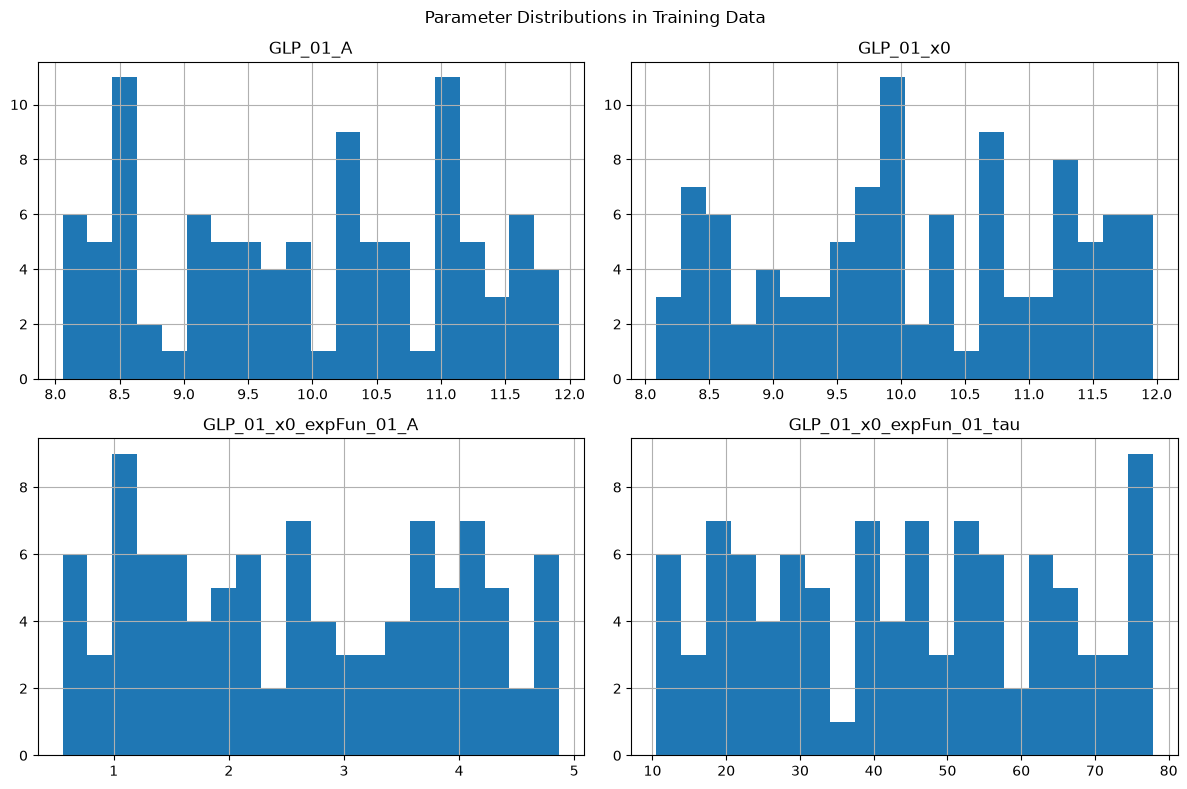
# Visualize parameter distributions
import matplotlib.pyplot as plt

df.hist(figsize=(12, 8), bins=20)
plt.suptitle("Parameter Distributions in Training Data")
plt.tight_layout()
plt.show()
# Load a specific configuration for inspection
config = dataset.load_config(0)

print(f"Config 0 parameters:")
for k, v in config['parameters'].items():
    print(f"  {k}: {v:.3f}")

print(f"\nData shapes:")
print(f"  Clean: {config['clean'].shape}")
print(f"  Noisy realizations: {len(config['noisy'])}")
print(f"  Each realization: {config['noisy'][0].shape}")
Config 0 parameters:
  GLP_01_A: 11.096
  GLP_01_x0: 9.756
  GLP_01_x0_expFun_01_A: 4.364
  GLP_01_x0_expFun_01_tau: 58.816

Data shapes:
  Clean: (1100, 2000)
  Noisy realizations: 20
  Each realization: (1100, 2000)
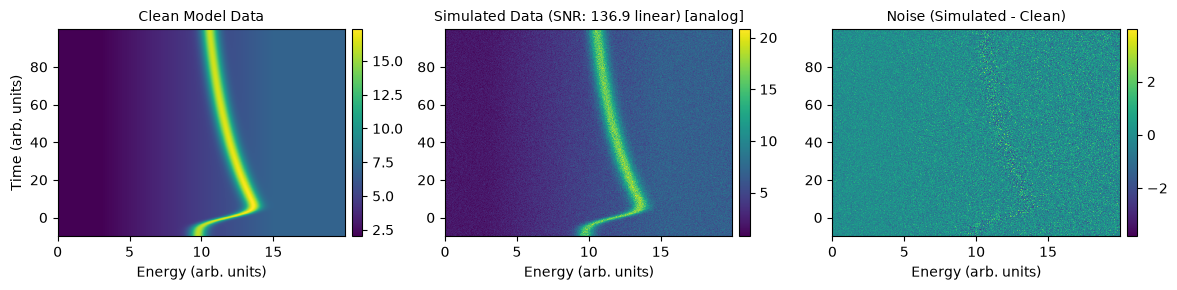
# Visualize a configuration (uses simulator's built-in plotting)
print("\nVisualize configuration 0:")
print(f"  - Or use your own plotting with dataset.get_axes() for x/y axes")
print(f"  - Or (see below): Load config, set sim.data_clean/noisy, call sim.plot_comparison(dim=2)")
# Temporarily set simulator data to this config for plotting
sim.data_clean = config['clean']
sim.data_noisy = config['noisy'][0]
sim.noise = config['noisy'][0] - config['clean']
sim.plot_comparison(dim=2)
Visualize configuration 0:
  - Or use your own plotting with dataset.get_axes() for x/y axes
  - Or (see below): Load config, set sim.data_clean/noisy, call sim.plot_comparison(dim=2)
5. Loading Data for ML Training#
For actual ML training, you’ll typically write a custom data loader for your framework (PyTorch, TensorFlow, etc.). Here’s a basic example using h5py directly:
import h5py

# Example: Load all data into memory (for small datasets)
def load_training_data(filepath, param_names):
    """
    Load parameter sweep data for ML training.

    Parameters
    ----------
    filepath : str
        Path to HDF5 file
    param_names : list of str
        Which parameters to extract as targets

    Returns
    -------
    x_all : list of arrays
        Input spectra (noisy realizations)
    y : list of arrays
        Target parameters for each spectrum
    """
    x_all = []  # Input: noisy spectra
    y = []  # Target: parameter values

    with h5py.File(filepath, 'r') as f:
        n_configs = f['metadata'].attrs['n_configs']

        for config_idx in range(n_configs):
            config_name = f'config_{config_idx:06d}'
            config_group = f['parameter_configs'][config_name]
            data_group = f['simulated_data'][config_name]

            # Extract target parameters
            targets = [config_group.attrs[name] for name in param_names]

            # Load all noisy realizations for this config
            for real_key in sorted(data_group.keys()):
                spectrum = data_group[real_key][:]
                x_all.append(spectrum)
                y.append(targets)

    return np.array(x_all), np.array(y)

# Example usage
x_train, y_train = load_training_data(
    'simulated_data/test_sweep.h5',
    param_names=['GLP_01_x0_expFun_01_A', 'GLP_01_x0_expFun_01_tau']
)

print(f"Training data shape: {x_train.shape}")
print(f"Target shape: {y_train.shape}")
print(f"\nFirst example target: {y_train[0]}")
Training data shape: (27, 1100, 2000)
Target shape: (27, 2)

First example target: [ 0.25       20.47912097]
Example: PyTorch Dataset Class#
For large datasets that don’t fit in memory:
# Uncomment if you have PyTorch installed:
# import torch
# from torch.utils.data import Dataset, DataLoader
#
# class SpectroscopyDataset(Dataset):
#     """PyTorch dataset for parameter sweep data."""
#
#     def __init__(self, filepath, param_names, transform=None):
#         self.filepath = filepath
#         self.param_names = param_names
#         self.transform = transform
#
#         # Load metadata
#         with h5py.File(filepath, 'r') as f:
#             self.n_configs = f['metadata'].attrs['n_configs']
#             self.n_realizations = f['metadata'].attrs['n_realizations_per_config']
#
#         self.total_samples = self.n_configs * self.n_realizations
#
#     def __len__(self):
#         return self.total_samples
#
#     def __getitem__(self, idx):
#         # Calculate which config and realization
#         config_idx = idx // self.n_realizations
#         real_idx = idx % self.n_realizations
#
#         with h5py.File(self.filepath, 'r') as f:
#             config_name = f'config_{config_idx:06d}'
#             config_group = f['parameter_configs'][config_name]
#             data_group = f['simulated_data'][config_name]
#
#             # Load spectrum
#             spectrum = data_group[f'{real_idx:06d}'][:]
#
#             # Load target parameters
#             targets = [config_group.attrs[name] for name in self.param_names]
#
#         if self.transform:
#             spectrum = self.transform(spectrum)
#
#         return torch.FloatTensor(spectrum), torch.FloatTensor(targets)
#
# # Create data loader
# dataset = SpectroscopyDataset(
#     'simulated_data/test_sweep.h5',
#     param_names=['GLP_01_x0_expFun_01_A', 'GLP_01_x0_expFun_01_tau']
# )
#
# train_loader = DataLoader(dataset, batch_size=32, shuffle=True)
#
# # Use in training loop
# for batch_spectra, batch_targets in train_loader:
#     # ... training code ...
#     pass

print("See commented code above for PyTorch example")
See commented code above for PyTorch example
Tips for ML Training Data#
Parameter Selection:
Start with 2-3 most important parameters
Use realistic ranges from your experimental data
Include correlations if parameters are physically related
Dataset Size:
Small networks: 1,000-5,000 examples often sufficient
Larger networks: 10,000-50,000 examples
More realizations per config = better uncertainty estimates
Noise Level:
Match your experimental SNR
Can generate multiple datasets with different noise levels
Consider augmentation during training (add more noise)
Validation Strategy:
Split by configuration, not by realization
Test on held-out parameter ranges
Validate on real experimental data when possible
Model files#
The YAML files next to this notebook, as shipped with the example.
models_energy.yaml#
# use these models to describe the energy-dependent data
# (available functions info: /src/trspecfit/functions/energy.py)

single_peak:
    Offset:
      y0: [2, True, 0, 5]
    LinBack:
      m: [4E-1, True, -1, 1]
      b: [0, True, -5, 5]
      xStart: [3, False, 0, 20]
      xStop: [15, False, 0, 20]
    GLP:
      A: [10, True, 5, 15]
      x0: [10, True, 5, 15]
      F: [1.0, True, 0.75, 2.5]
      m: [0.3, True, 0, 1]

single_peak_only:
    GLP:
      A: [10, True, 5, 15]
      x0: [10, True, 5, 15]
      F: [1.0, True, 0.75, 2.5]
      m: [0.3, True, 0, 1]

dependent_peaks:
    Offset:
      y0: [2, True, 0, 5]
    Shirley:
      pShirley: [4.0E-4, True, 1.0E-12, 1.0E-3]
    GLP:
      A: [10, True, 5, 15]
      x0: [8, True, 3, 12]
      F: [1.0, True, 0.75, 2.5]
      m: [0.3, True, 0, 1]
    GLP:
      A: ["GLP_01_A*3/4"]
      x0: ["GLP_01_x0+3.6"]
      F: ["GLP_01_F"]
      m: ["GLP_01_m"]
models_time.yaml#
# use these models to add time-dependence to a parameter in a 2D model
# (available functions: /src/trspecfit/functions/time.py)

IRF:
    # define Gauss to convolve everything with
    # (instrument response function)
    gaussCONV:
        SD: [5.0E-2, True, 1.0E-6, 1]

MonoExpPos:
    # expFun(t, A, tau, t0)
    expFun:
        A: [1, True, 0, 5]
        tau: [2.5, True, 1, 10]
        t0: [0, False, 0, 1]

MonoExpNeg:
    # expFun(t, A, tau, t0)
    expFun:
        A: [-1, True, -5, 0]
        tau: [2.5, True, 1, 10]
        t0: [0, False, 0, 1]

MonoExpPosIRF:
    gaussCONV:
        SD: [3, True, 1.0E-6, 10]
    expFun:
        A: [5, True, 0, 15]
        tau: [50, True, 1, 100]
        t0: [0, False, 0, 1]
project.yaml#
# Project configuration for trspecfit ML training data generation example

# Display settings (general verbosity)
show_output: 1  # 0: silent/API mode, 1: interactive/notebook mode

# Axis labels
e_label: 'Energy (arb. units)' # x -> energy
t_label: 'Time (arb, units)' # y -> time
z_label: 'Intensity (arb. units)' # z -> intensity

# Plot settings
x_dir: 'def'  # def(ault) or rev(erse)
x_type: 'lin'  # lin or log
y_dir: 'def'  # def(ault) or rev(erse)
y_type: 'lin'  # lin or log
z_colormap: 'viridis' # colormap in 2D plots
z_type: 'lin'  # lin or log (2D plots)
dpi_plt: 100 # figure display dpi
dpi_save: 300 # figure save dpi
res_mult: 5 # residual multiplier in figures